

Smarter Connections for Daily Drives around Aberdeen, SD – 2026 Mitsubishi Outlander Sport’s Apple CarPlay and Android Auto Explained
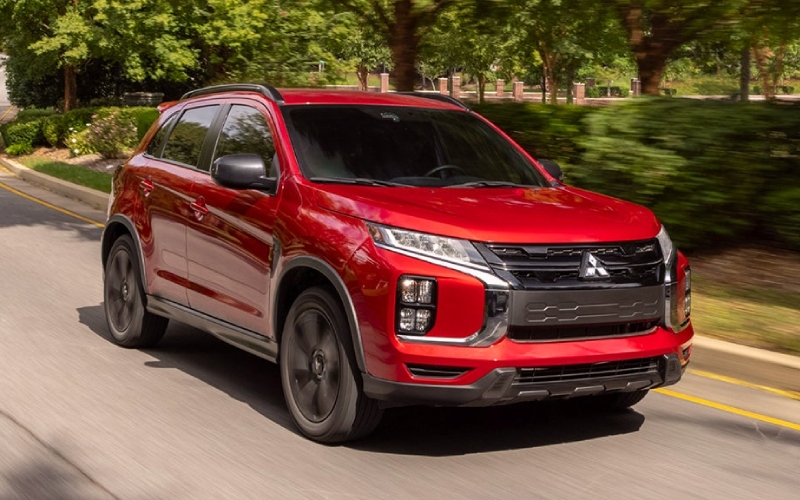
Vern Eide Mitsubishi – Smarter Connections for Daily Drives around Aberdeen, SD – 2026 Mitsubishi Outlander Sport’s Apple CarPlay and Android Auto Explained
When your day pivots from work calls to playlists to navigation, the 2026 Mitsubishi Outlander Sport makes it all feel seamless with standard Apple CarPlay® and Android Auto on its 8.0-inch Smartphone-Link Display Audio. The interface looks familiar, the voice controls are natural, and it cuts the clutter from juggling your phone while navigating between Aberdeen landmarks, Highway 12, and those quick stops on 6th Avenue SE. Whether you are streaming podcasts, pulling up directions to a weekend trailhead, or sending a hands-free message, the setup is as plug-and-go as it gets.
What You Get the First Time You Plug In
The moment you connect, your favorite apps appear in a clean, organized layout, sized perfectly for the Outlander Sport’s crisp display. Maps give you real-time overlays, your messaging apps route safely through voice controls, and your streaming services put recent content front and center. Need to call home from a frontage road with traffic building near 281? Use Siri® or Google Assistant to place the call without lifting your hands from the wheel. It is intuitive, it is responsive, and it feels like bringing your phone’s best features into an automotive interface designed for the road.
Daily Convenience Without the Distractions
CarPlay® and Android Auto simplify frequent tasks in ways that actually reduce distraction. Navigation integrates with your contacts and calendar, so addresses are just a tap or voice command away. Notifications are filtered into audio prompts you can accept or ignore. And because the system is paired with steering wheel audio and phone controls, you can keep your focus on the road surface—especially helpful when you transition from smooth city pavement to rural gravel outside Aberdeen.
Beyond the Basics: Tips That Make a Difference
- Voice-first commands: Use Siri® or Google Assistant for messages, calls, and navigation to minimize screen taps.
- Curated apps: Keep only essential driving apps on your CarPlay® or Android Auto home screen to reduce clutter.
- Route planning: Preload waypoints at home so multi-stop errands are one tap away once you start the engine.
- Audio mastering: Adjust EQ and source settings before you roll to lock in a consistent sound profile for podcasts and music.
- Do Not Disturb: Enable driving modes that silence non-urgent notifications while you are on the move.
If you have never used smartphone mirroring before, the Outlander Sport makes the learning curve short. Cables are straightforward, the ports are conveniently placed, and the display’s responsiveness means you do not suffer lag between taps and actions. That ease matters most when the road throws a curve—a sudden detour around construction, a change in meeting time while you’re already headed west, or a request to pick up supplies on your way home. Good systems get out of your way, and this one does exactly that.
How CarPlay and Android Auto Fit the Bigger Outlander Sport Picture
While the connectivity stands out, it is the way CarPlay® and Android Auto complement the rest of the 2026 Outlander Sport that really clicks. Standard All-Wheel Control (AWC) adds confidence in changing conditions, LED low and high beams brighten backroads at dusk, and rain-sensing wipers simplify those on-off drizzles that turn into steady showers. Meanwhile, Forward Collision Mitigation (FCM) with Pedestrian Detection, Lane Departure Warning (LDW), and Automatic High Beam (AHB) create a calm, supporting backdrop that lets you lean into technology without feeling tethered to it.
Frequently Asked Questions:
Do I need specific cables to use Apple CarPlay or Android Auto?
Use a high-quality USB cable compatible with your phone’s port. Plug in, grant permissions on your device, and the system should launch automatically.
Can I still use Bluetooth while CarPlay or Android Auto is active?
Yes. While the phone is connected via USB for mirroring, Bluetooth® typically manages call audio and other connections without conflict.
What navigation apps work best?
Apple Maps, Google Maps, and Waze all work smoothly. Choose the one you already use on your phone for the best continuity of favorites and recent searches.
Does voice control really work in a noisy cabin?
The Outlander Sport’s microphones are tuned for in-cabin clarity. Speak naturally and close windows at highway speeds for the best results.
Will my apps update automatically on the vehicle screen?
Yes. Updates occur on your phone, and the changes carry over each time you reconnect to the vehicle.
Why Local Shoppers Care
In a place where daily drives span everything from short city hops to longer regional trips, predictable tech matters. CarPlay® and Android Auto keep your routines efficient while the Outlander Sport’s chassis and AWC make mixed-surface routes feel composed. Whether you are meeting clients on the north side of town or hopping out to a trailhead on the weekend, connection and confidence travel together in this SUV.
When you are ready to test real-world usability—plug-in speed, voice control accuracy, and display readability in bright daylight—schedule a drive with our team at Vern Eide Mitsubishi. We are serving Aberdeen, Brookings, and Watertown and can walk you through app setup, privacy settings, and tailored routes so you can see how the system keeps up with your day.
0 comment(s) so far on Smarter Connections for Daily Drives around Aberdeen, SD – 2026 Mitsubishi Outlander Sport’s Apple CarPlay and Android Auto Explained